The ergonomic home-office starter kit
You don't need to spend a fortune or buy everything at once. Here's the short list of gear that genuinely changes how your body feels at the end of a workday — and the order to buy it in.
At a glance
| Product | Best for | Price | Warranty |
|---|---|---|---|
| Charge Monitor Riser | Monitor riser with built-in wireless charging pad | € 127.95 | 2 years |
| Rise Aluminium Laptop Stand | Rotatable aluminium, lifts screen to eye level | € 29.95 | 2 years |
| Crane Gas-Spring Monitor Arm | Gas-spring single arm, up to 27", 10 kg | € 79.95 | 2 years |
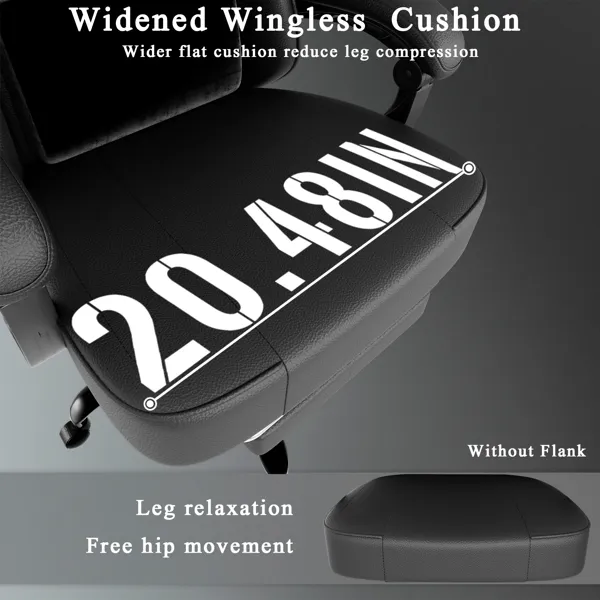
| Spring Gaming Chair with Footrest | Pocket-spring cushion, fold-out footrest | € 152.95 | 2 years |
What a starter kit actually needs (and what it doesn't)
An ergonomic desk isn't a shopping list of gadgets: it's four things working together: a screen at the right height, a chair that supports a neutral spine, input devices that keep your wrists straight, and light that doesn't fight your monitor. Get those four right and you've solved roughly 90% of the aches people blame on "working from home". Everything else is refinement. The goal you're building toward is neutral posture: eyes looking slightly down at the top third of the screen, elbows bent around 90 to 100 degrees with forearms roughly parallel to the floor, shoulders relaxed, and feet flat. If a purchase moves you closer to that picture, it earns its place. If it doesn't, it's decoration. That single test will save you more money than any discount code. A quick note before you spend anything: this is general ergonomics guidance, not medical advice. If you have persistent pain, numbness or tingling, see a physiotherapist or doctor: no piece of gear substitutes for a professional assessment.
First: get the screen to eye level
This is the highest-impact, lowest-cost change you can make, so start here. A laptop or a low monitor pulls your head forward and down, and your neck carries that load all day. You want the top of the screen at or just below eye level, about an arm's length away (50 to 70 cm). When you look straight ahead, your gaze should land on the top third of the display. If you work on a monitor, a simple riser lifts it to the right height and reclaims the space underneath for a keyboard or clutter. A bamboo shelf riser is the honest starting point: sturdy, tidy, and it doubles as a shelf. If you work on a laptop, raise the laptop on a stand and add a separate keyboard and mouse: a screen you type on can't be at eye level and under your hands at the same time, so you have to split them. When you're ready to free up the whole desktop and fine-tune position, a gas-spring monitor arm floats the screen exactly where you want it and pushes back for standing later.
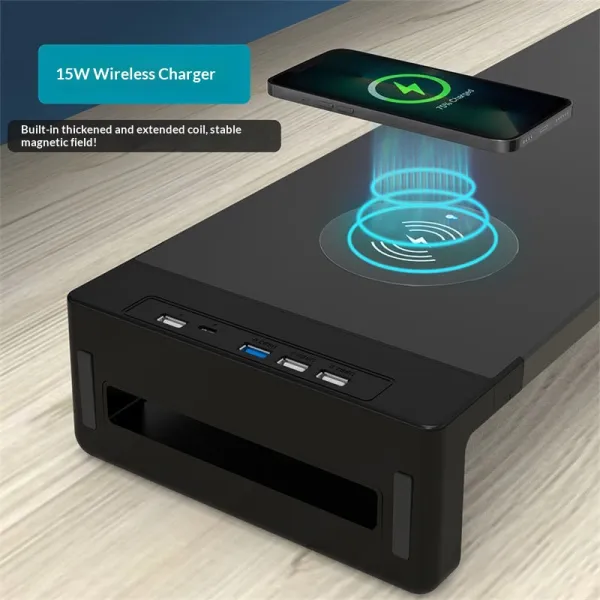
Charge Monitor Riser
Monitor riser with built-in wireless charging pad
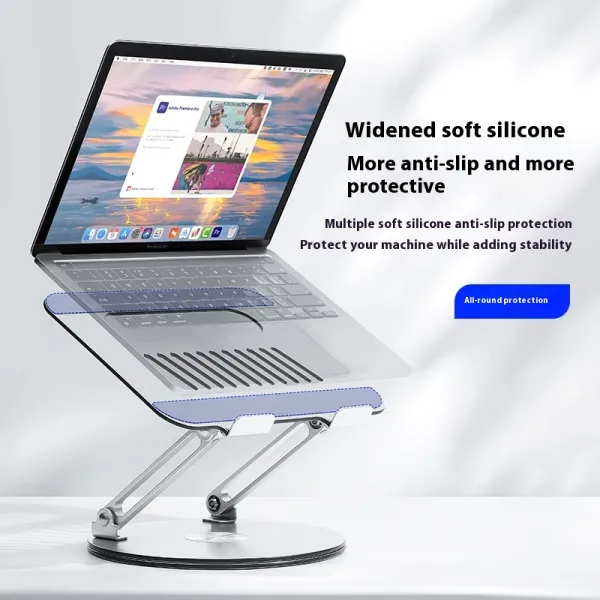
Rise Aluminium Laptop Stand
Rotatable aluminium, lifts screen to eye level
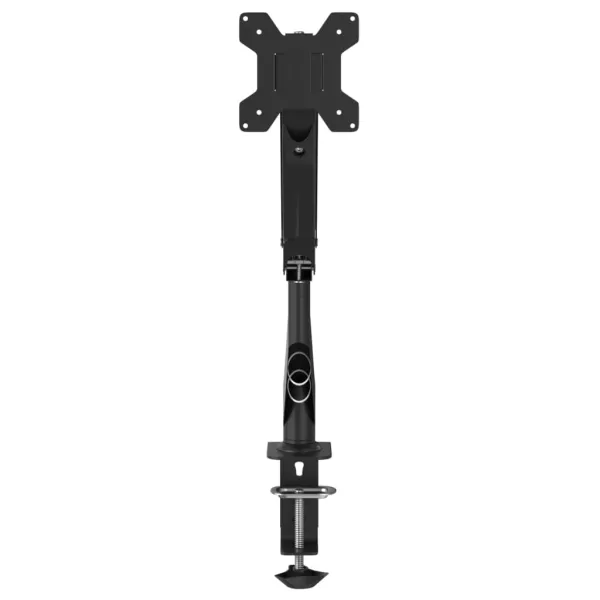
Crane Gas-Spring Monitor Arm
Gas-spring single arm, up to 27", 10 kg
The chair is where the money goes
If there's one place to spend the largest share of your budget, it's the chair: you're in contact with it for six to nine hours a day, and no accessory rescues a bad one. Look for three adjustments that matter more than the marketing: seat height (so your feet rest flat and thighs sit roughly parallel to the floor), seat depth or a seat pan that leaves two to three fingers' gap behind your knees, and real lumbar support that meets the inward curve of your lower back. A breathable mesh chair with full adjustment is the sensible all-rounder for most home offices: it keeps you cool and lets you dial in the fit. If space or budget is tight, a compact task chair with proper back support covers the essentials without dominating a small room. And if you already own a decent chair that just lacks lower-back support, a strap-on lumbar cushion is a cheap, effective retrofit before you replace anything. One rule of thumb: set the chair to your body first, then set the desk and screen to the chair. Doing it the other way round is how people end up perching or slumping.
Keep your wrists and hands neutral
Once the screen and chair are sorted, your hands are the next thing to protect. The aim is straight wrists: not bent up toward the screen, not cocked out to the sides. Standard flat keyboards and mice quietly force both, and that's where a lot of wrist and forearm strain comes from. A vertical or ergonomic mouse rotates your hand into a more natural "handshake" position, which takes the twist out of your forearm. A curved or split ergonomic keyboard lets your wrists sit straighter and your shoulders open up instead of hunching inward. Neither has to be exotic or expensive to help. Wrist rests are widely misunderstood: they're not meant to be leaned on while you type. Their job is to support your wrists during the pauses, keeping them level with the keys rather than dropping onto a hard edge. A slim memory-foam rest in front of the keyboard, and a small pad by the mouse, do that quietly for very little money.
Light it so your eyes stop working overtime
Lighting is the piece almost everyone skips, and it's a direct cause of eye strain and end-of-day headaches. Two problems dominate home setups: a bright window or lamp reflecting off the screen, and a bright screen floating in a dark room. Both make your eyes constantly readjust. Start by positioning your monitor perpendicular to the window: side-on, not facing it or backed against it: so daylight doesn't glare off the glass or blast into your eyes behind it. Then add ambient light so the wall behind your screen isn't much darker than the screen itself; a big screen-to-background contrast is what tires your eyes. A monitor light bar is the tidy specialist here: it clips to the top of the screen, lights your desk and keyboard, and is angled so no light spills onto the display: no reflections, no desk footprint. For focused tasks like reading or paperwork, a desk lamp with adjustable brightness and a warm-to-cool range lets you match the light to the time of day and warm it down in the evening. A rough target for detailed work is around 500 lux at the desk surface.
Small supports, and how to phase it on a budget
A few inexpensive items finish the kit and fix problems the big pieces can't. If, after setting your chair so your elbows meet the desk correctly, your feet don't rest flat on the floor, a footrest restores the support your legs need and takes pressure off the backs of your thighs: a common issue for shorter people and anyone with a fixed-height desk. Cable management belongs here too: cables that snag your chair or pull your laptop toward the edge are a daily friction you stop noticing but keep paying for, and a simple clip-and-sleeve kit routes them out of the way in ten minutes. You don't have to buy the whole kit in one go, and you shouldn't. Buy in the order your body will thank you fastest. Phase one, spend almost nothing: raise your screen to eye level and reposition it away from window glare: that alone changes how your neck and eyes feel within days. Phase two is the chair, the biggest single spend and the one worth saving for rather than settling on a cheap compromise. Phase three tidies the hands and the light; phase four is the finishing touches: footrest, lumbar cushion, cable kit: cheap items that solve specific niggles once you know which ones you actually have. Everything ships free within the Netherlands, prices include VAT, and there's a 14-day return window and a 2-year warranty: so if a chair or keyboard doesn't suit your body once it's in the room, you're not stuck with it. Buy for the posture you're building toward, test it against the neutral-posture picture above, and add the next piece only when the last one has settled in.
FAQ
What's the one thing to buy first?
Raise your screen. Getting the top of your monitor or laptop to eye level, an arm's length away, is the cheapest change and the one your neck notices fastest: a riser or laptop stand costs a fraction of a chair and fixes the most common home-office complaint. If you're on a laptop, add a separate keyboard and mouse so the screen can go up while your hands stay low.
How much should I budget for a decent starter setup?
Think in tiers rather than a single number. The screen fix (a riser or stand) is usually under 60 euro. The chair is the real investment and where most of your budget should go, since you're in it all day. Input devices, a light bar or lamp, and small supports like a footrest or cable kit each sit in the low tens of euro. You can build a genuinely good setup over a few paydays instead of all at once.
Do I need a standing desk to be ergonomic?
No. A well-set-up seated desk with the screen at eye level and a supportive chair is perfectly ergonomic. Standing is valuable mainly because it breaks up long stretches of sitting: but you get most of that benefit just by standing up and moving for a few minutes every half hour. If you do want the option later, a sit-stand converter or an adjustable frame lets you add it without replacing your whole desk.
Will ergonomic gear fix my back or wrist pain?
Good gear removes the strain that causes a lot of everyday aches: a neutral screen height, a supportive chair and straight wrists genuinely help. But this is general guidance, not medical advice. If you have persistent pain, numbness or tingling, see a physiotherapist or doctor; a proper assessment matters more than any product, and equipment works best alongside it rather than instead of it.